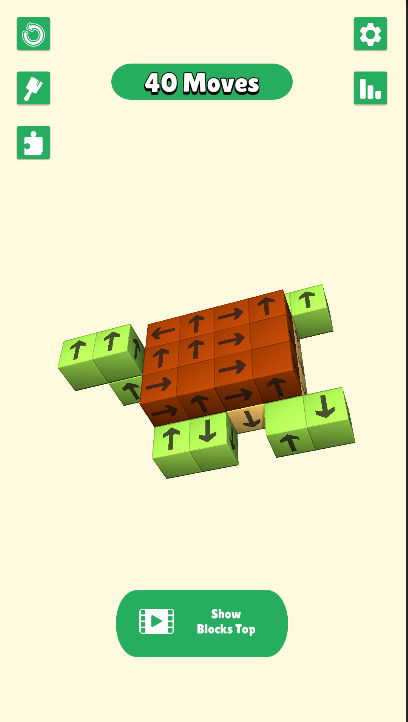
Tap Away: Take Blocks Away 3D is a Puzzle application developed by GTQ llc, but with the best Android emulator-LDPlayer, you can download and play Tap Away: Take Blocks Away 3D on your computer.
Running Tap Away: Take Blocks Away 3D on your computer allows you to browse clearly on a large screen, and controlling the application with a mouse and keyboard is much faster than using touchscreen, all while never having to worry about device battery issues.
With multi-instance and synchronization features, you can even run multiple applications and accounts on your PC.
And file sharing makes sharing images, videos, and files incredibly easy.
Download Tap Away: Take Blocks Away 3D and run it on your PC. Enjoy the large screen and high-definition quality on your PC!
Introducing "Tap away: Take blocks away 3D" - the ultimate tap game that challenges your timing, spatial awareness, and puzzle-solving skills! In this thrilling 3D block puzzle adventure, get ready to tap away, tap on time, and tap your way to victory in an immersive world of block-stacking excitement.Embark on an addictive journey where every tap matters. With "Tap away: Take blocks away 3D," the challenge is to tap away strategically, tapping on time to remove blocks and clear the path to success. Engage your mind and reflexes as you delve into this tap away 3D extravaganza, where each tap counts towards unraveling intricate block puzzles.
Experience the thrill of tap out sessions where your precision is put to the test. This tap game isn't just about tapping randomly; it's about tapping with purpose, tapping with finesse, tapping to conquer each level with mastery. With "Tap away: Take blocks away 3D," you'll find yourself immersed in a world where tapping is not just a game mechanic but a strategy for success.
Stacking games have never been this captivating! Dive into the world of "Tap away: Take blocks away 3D" and discover the joy of stacking blocks in a mesmerizing 3D environment. Shape games take on a whole new dimension as you navigate through challenging levels, each more complex than the last. With its intuitive gameplay and stunning visuals, this tap game promises endless hours of fun and brain-teasing entertainment.
"Tap away: Take blocks away 3D" isn't just another puzzle game; it's a brain test like no other. Exercise your mental muscles as you strategize, plan, and tap your way through a variety of block escape scenarios. From simple challenges to head-scratching conundrums, this puzzle game offers something for players of all skill levels.
Get ready to tap it, tap it, and tap it some more! With "Tap away: Take blocks away 3D," the tapping never stops. Whether you're a casual gamer looking for a fun distraction or a seasoned puzzle enthusiast seeking a new challenge, this game has something for everyone. Immerse yourself in the addictive world of 3D blocks and let the tapping begin!
But beware, success won't come easy. With each level presenting new obstacles and challenges, you'll need to stay sharp and focused if you want to emerge victorious. Are you up for the challenge? Can you tap away your way to victory and become the ultimate master of block puzzles?
Download "Tap away: Take blocks away 3D" now and put your tapping skills to the test! Whether you're tapping away on your commute, during your lunch break, or just relaxing at home, this fun game promises hours of entertainment and excitement. Don't miss out on the block-stacking sensation that's taking the gaming world by storm. Get tapping today!