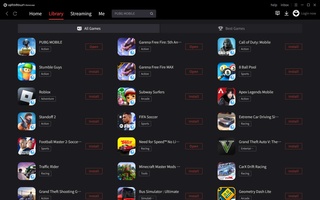


Uptodown GameLoop is a Casual game developed by . LDPlayer is the best platform for playing Uptodown GameLoop on Windows PC, offering powerful features to enhance your immersive experience in Uptodown GameLoop.
When playing Uptodown GameLoop on your computer, if you find repetitive actions or tasks tedious and time-consuming, fret not! Macro can alleviate your concerns. Simply record your actions with a click of the screen recording feature and let macros take care of the rest. Macros automate your operations, allowing you to effortlessly conquer the game with minimal effort! Start downloading and playing Uptodown GameLoop on your computer now!
Uptodown GameLoop is the official Tencent emulator for Windows, which can be used to easily play the best Android games on PC. Among these are games such as PUBG Mobile, Free Fire, Call of Duty: Mobile, Apex Legends Mobile, Clash Royale, Pokémon UNITE, Stumble Guys, Lords Mobile, and many more.
Uptodown GameLoop is available in English, Spanish, German, Indonesian, Portuguese, Turkish, Chinese, Japanese, Vietnamese, Thai, Urdu and Arabic. The interface is very intuitive, allowing you to install and run all the games with ease. In the Home section, you can find the most popular games, interesting new releases, and other popular apps that you might be interested in installing.
You can view the games you have installed in the Library or Me tabs. In the first tab, you can directly run the games and quickly install any others you don't have. In the Me tab, you can see your installed games and check your other account settings and data.
There is also a Live tab, where you can watch other players' live streams. Lastly, you have the Novel tab, where you can read video game and fantasy story-related news and content.
Installing games in Uptodown GameLoop is very easy. You just have to tap install on the game you want, and the emulator takes care of the rest. In all the popular games, such as PUBG or Free Fire, the keys are preset, and you can play as if the game were originally made for PC. In fact, the mouse is used as a native input, which lets you kill enemies much more easily.
So, if you want to play your favorite Android game on PC, downloading the Uptodown GameLoop emulator is one of the best options out there.