Goddess Order Reroll Guide with LDPlayer – Step by Step Guide

Thisara Dilshan
|2025-09-22In Goddess Order, a tag-team pixel action RPG, this practice helps secure strong starting characters to ease early progression in side-scrolling battles, where switching between three knights is key to combos and survival. You will need a Goddess Order reroll guide to minimize frustration from weak starters, aiming for characters that excel in damage output, support, or control right from the start as a Goddess Order beginner. So, here we are.
Contents
Step-by-Step Goddess Order Reroll Process
If you want the best starting units in Goddess Order, rerolling can save you a lot of time and resources. Follow these steps carefully, and don’t skip any.
Start by installing and launching the game from Google Play or the App Store. Begin as a guest account to avoid binding too early.
-
Next, complete the tutorial. Play through the opening stages to learn basic controls like tagging knights and parrying attacks. Finishing this unlocks the main menu and gives you your first rewards.
-
Once the tutorial is done, claim your starting rewards. Open the gift box in the menu to collect pre-registration bonuses, which usually include summon tickets, ma pages for currency, and tutorial pulls. This unlocks your access to the summon system.
-
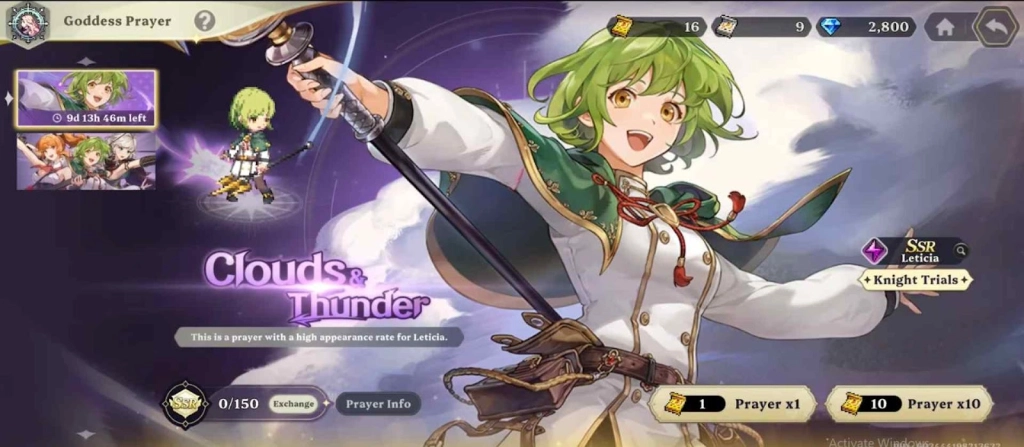
Now it’s time to perform your initial summons. Go to the summon menu and use the pickup banner if it offers an SSR guarantee on your first multi-pull. If not, opt for premium summons. You can expect around 10-15 pulls from starter rewards, with a focus on landing SSR units.
-
After summoning, evaluate your results. Check if you got the SSR knights you want. If not satisfied, go back to the title screen.
-
To start over, reset your data. Either select “Delete User Data” in-game or clear the app cache and storage via your device settings. Restart the game and begin again. Once you’ve done your first cycle, you can skip the tutorial in future rerolls to save time.
-
Repeat the process until you pull 1-2 strong SSR units that fit your target. When you’re happy with your results, bind the account through Google, Apple, or Kakao to secure your progress.
Each full cycle takes about 5-10 minutes at first, but after the initial run, it can drop to 2-3 minutes. Depending on your luck, expect to try 20-50 times to get ideal results. And if this takes time, the best option you have is with LDPlayer for effective rerolling.
Using LDPlayer for Goddess Order Rerolling
-
Install LDPlayer from the official website
-
Download Goddess Order through LDPlayer and then install, but do not start playing
-
Head to the menu of the emulator and click LDMultiplayer
-
Create multiple instances of the game with it based on your PC storage
-
Head back to the menu and click Synchronizer
-
Sync all the emulator copies you created. So you can have the same rerolling through each
-
Now reroll from the primary emulator, and you can have multiple rerolls done at once
LDPlayer - The best android emulator to play Goddess Order on PC

Multi-instance & Sync: Operate multiple accounts simultaneously to improve rerolling efficiency
One-key Macro:Record and auto-execute your actions, making resource farming and dungeon clearing a breeze
High FPS & Keyboard Mapping:Smoother combat, precise skill activation, and no lag or frame drops
Video Recorder:Record highlights and turn them into shareable videos
Download LDPlayer now and enjoy your epic adventure on PC!
Who to Aim For: Recommended Goddess Order Characters
Focus on SSR knights that cover DPS, support, and utility roles from the Goddess Order tier list. Based on launch meta, prioritize these for their synergy in tag-team fights:
|
Character |
Attribute |
Role |
Key Strengths |
Why Reroll For? |
|
Leticia |
Electric |
Slayer |
Energy consumption reduction, electrocution damage boost, EX relic for regen on status application |
Top DPS with sustained output; excels in applying debuffs for combo chains. |
|
Scarlet |
Fire |
Fighter |
Burn application, +50% vision charge on burn hits, DoT damage, invincibility |
Burn specialist for area control; combines burst and survivability for aggressive tagging. |
|
Roan |
Lightning |
Breaker |
Burn/stun application, -25% skill cost, 20% damage reduction, defense debuff |
Control tank; weakens foes while protecting the team, ideal for defensive setups. |



People Also Ask
How long does it take to reroll in Goddess Order?
Each reroll takes 5-10 minutes initially, dropping to 2-3 minutes after skipping the tutorial. Expect 20-50 attempts for ideal SSRs.
Is it worth rerolling for multiple SSRs in Goddess Order?
Yes, aim for 1-2 top SSRs like Letisha and Deina to ensure strong early-game synergy and smoother stage clears.
What should I do after getting good characters from rerolling?
Bind your account immediately, save summon tickets for event banners, and focus more resources on upgrading your core team.
Conclusion
That is how you can do your Goddess Order reroll process. Follow the steps and make sure to go with LDPlayer as well for a faster yet effective hero summoned. And don’t forget about the Goddess Order codes as well, if you want more freebies to upgrade them.