home page
Games
Pre-RegisterRPGStrategyAdventureCasualArcadeRacingActionSimulation
Support
LDPlayer 9 IntroductionEnable VTStartup Stuck at 50%/94%Fix Invalid Virtual DiskUpdate Graphics DriverKeyboard MappingEnable LDMultiplayerFPS Setting
Blogs
Updates
LDGame
Affiliate
LDGame Community
download ldplayer
Download LDPlayer
English
繁體中文한국어Tiếng ViệtภาษาไทยPусскийPortuguêsEspañolFrançaisDeutsch日本語Indonesiaالعربية

LDPlayer Support

EmailFacebookDiscordLDGame Customer Service(For LDPlayer account & recharge problem)

Products

LDCloudOSLinkEasyFunLDShop

About

About UsBusiness InquiryDMCA Takedown

Follow Us

©2025 LDPLAYER.NET , ALL RIGHTS RESERVED.JUST OKAY LIMITED , OFFICE F, 12/F, YHC TOWER , 1 SHEUNG YUET RD, KOWLOON BAY KLN, HONG KONG
Games and applications on this site are collected from the internet. If there is any infringement, please contact the email: support@ldplayer.net
Privacy Policy|GDPR Privacy Notice|Help Translate
English
繁體中文한국어Tiếng ViệtภาษาไทยPусскийPortuguêsEspañolFrançaisDeutsch日本語Indonesiaالعربية

Blogs/

News

Introduction to version 4.0.37 & 3.102 features

2020-09-30

In view of the positive feedback from players, further improvements in security have been made in our new versions (4.0.37 & 3.102), which are described in detail below.

1. The Android Debug Bridge (ADB) is turned off by default.
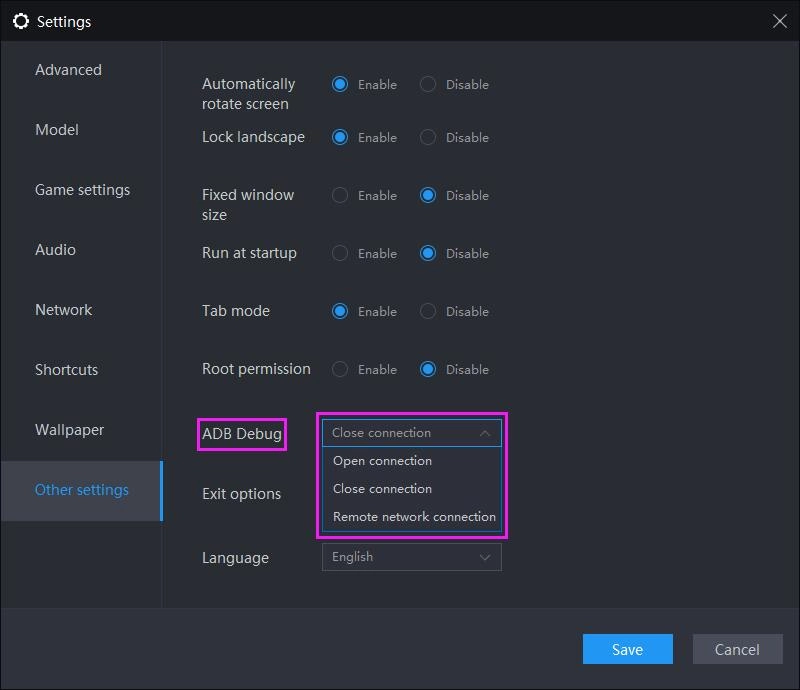
In the new version settings, a control option for ADB has been newly added, which is turned off by default, which effectively cuts off the connection between the local computer and the emulator, which can effectively prevent some malicious programs from attacking the emulator or stealing information, greatly improving security.
Introduction to version 4.0.37 & 3.102 features

ADB has three states available, whose functions are respectively to:
Close connection: The local computer cannot access the emulator through ADB when closing ADB.
Open local connection: The local computer can access the emulator through ADB.
Open remote connection: Other computers in the LAN can access the emulator through ADB. (Not recommended)
Introduction to version 4.0.37 & 3.102 features

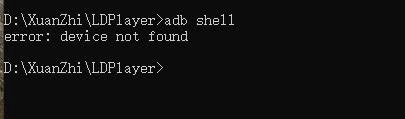
When ADB is closed, the computer cannot find the emulator device

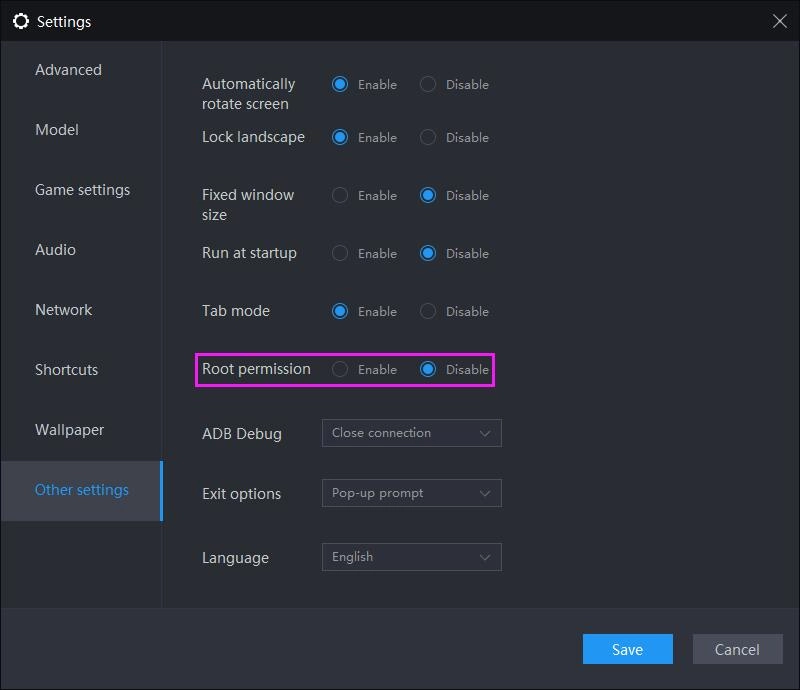
2. The Root permission is disabled by default.
If you install a new version in a new directory, the Root permission will be turned off by default, or you can manually turn off this option. After closing it, the apps in the emulator will not get the Root permission, which effectively prevents some malicious apps from doing some illegal behaviors. To ensure environmental safety to the greatest extent, here, it is also recommended that users only download apps from LD Store and Google Play Store, not from other websites or app stores.
Introduction to version 4.0.37 & 3.102 features

BTS Universe Story Game Introduction and How to create Stories?
|
Grand Alliance Early Access and How to Battle on?

LDPlayer Emulator

You May Also Like
MONGIL:STAR DIVE Best Teams 2026: Top Team Comps & Team Building Guide
Whiteout Survival Expert Kathy Guide: Complete Build, Skills & Upgrade Tips
BLEACH Soul Resonance Szayelaporro Granz Build Guide: Master the Espada Scientist 2026
Bite By Night Codes April 2026 (Newest Codes)
How to Play Plants vs. Zombies™ 3 on PC?
Reverse: 1999 Paper Heron Build Guide – Best Psychubes, Resonance, Teams & More

LDPlayer Emulator