

Designer City: building game is a Simulation application developed by SGS - City Building Games, but with the best Android emulator-LDPlayer, you can download and play Designer City: building game on your computer.
Running Designer City: building game on your computer allows you to browse clearly on a large screen, and controlling the application with a mouse and keyboard is much faster than using touchscreen, all while never having to worry about device battery issues.
With multi-instance and synchronization features, you can even run multiple applications and accounts on your PC.
And file sharing makes sharing images, videos, and files incredibly easy.
Download Designer City: building game and run it on your PC. Enjoy the large screen and high-definition quality on your PC!
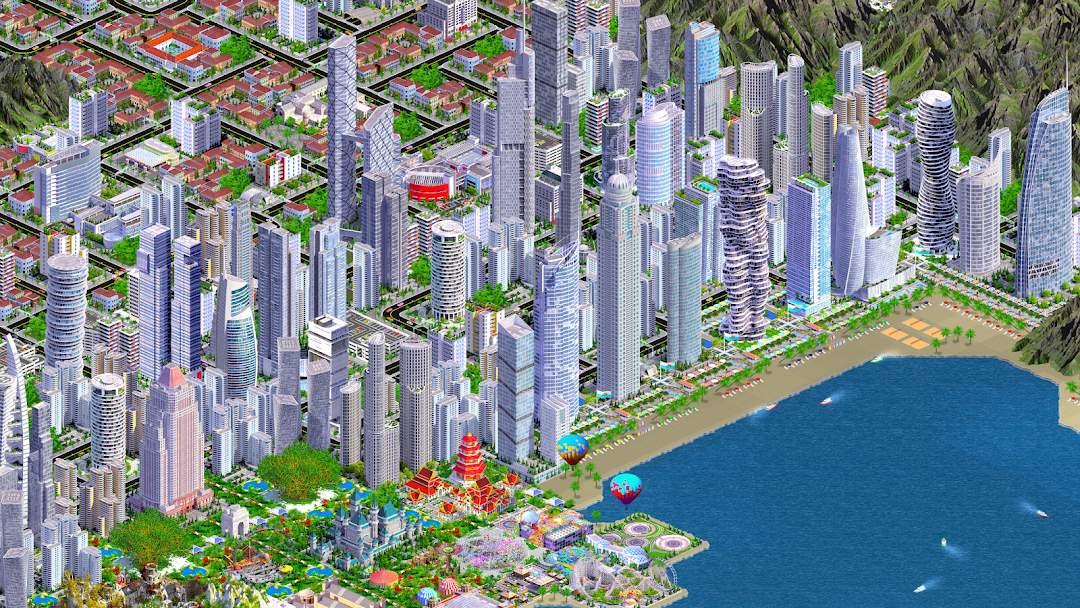
Free Offline City Building Game – No Wait TimesTired of waiting to build? In this free offline city building game there are no timers—you control the pace. Design your city, expand your skyline, and create a thriving metropolis with 2,000+ landmarks and skyscrapers.
BUILD YOUR CITY, YOUR WAY
Construct houses, apartments and skyscrapers to attract residents. Create jobs with commercial and industrial buildings. Add city services, sports, leisure and community buildings, parks and decorations to keep everyone happy. Design a unique city skyline filled with landmarks, monuments and world-famous towers.
BECOME A CITY TYCOON
Happy citizens work harder and generate more income for you to reinvest. Manage transportation networks of roads, railways, subways and highways to keep people moving. Build airports, seaports and farms to boost business, trade and food supply. Expand beyond the city with an army, navy, air force and even a space program.
STRATEGY AND SIMULATION
Choose how you want to play:
• Relax and design a beautiful city skyline.
• Use advanced analytics and statistics to optimize your city.
• Manage pollution, zoning, services and revenue like a true city tycoon.
DYNAMIC AND UNIQUE
Every city is different thanks to dynamic land generation. Shape the landscape however you want - add rivers, mountain ranges, forests and lakes. Create a green, carbon-neutral city using renewable power and public transport, or build a bustling downtown packed with skyscrapers and real life buildings.
ENDLESS CITY BUILDING FUN
With almost 2,000 buildings, trees and decorations, no two cities will ever be the same. Reset and build again on a brand-new landscape. Climb the leaderboards with your dream city.
PLAY FREE, OFFLINE OR ONLINE
Designer City can be played completely free. No internet connection required. Optional in-game purchases are available if you wish to expand even faster.