
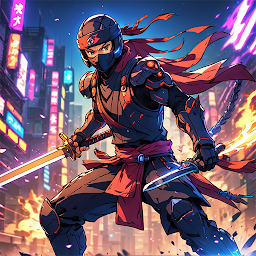


Iron Guardian : Saga is a Action game developed by Farid Anwar, and LDPlayer is the best platform for playing Iron Guardian : Saga on PC, offering powerful features to immerse you in the game.
When playing Iron Guardian : Saga on computer, you can adjust frame rate settings for smooth gameplay and stunning visuals.
LDPlayer also provides pre-configured keyboard mapping for convenient control of the entire game. Continuous optimization of keyboard mapping enhances key sensitivity and skill accuracy. Additionally, LDPlayer offers special buttons like shoot, hide mouse, and continuous key press for an enhanced gaming experience.
If you prefer using a gamepad, the automatic gamepad detection allows you to customize controls with just a few clicks, enabling you to freely maneuver your hero. Start downloading and playing Iron Guardian : Saga on your computer now!
Embark on an epic journey in Iron Guardian: Saga!Step into the metallic boots of a futuristic samurai, equipped with cutting-edge technology and ancient warrior skills. In this thrilling game, you'll traverse challenging levels and battle formidable enemies to rescue the captured queen from the clutches of a powerful vampire. With each level, the stakes grow higher and the foes more dangerous. Unleash your inner warrior and prove your mettle in this electrifying adventure!
Darkness has fallen over the kingdom as the malevolent vampire lord seizes the queen. As the kingdom's last hope, you, the Iron Guardian, must embark on a perilous quest to save her. Armed with advanced weaponry and honed in the art of combat, you will face relentless enemies and treacherous traps. Navigate through futuristic landscapes and ancient ruins, adapting your strategies to overcome each unique challenge.
In Iron Guardian: Saga, you'll master a combination of high-tech gadgets and traditional swordplay. Upgrade your skills and gear to enhance your combat prowess and outsmart your enemies. Along the way, uncover hidden secrets, forge alliances, and unlock powerful abilities that will aid you in your mission.
Can you defeat the vampire lord and rescue the queen? The fate of the kingdom lies in your hands. Prepare for a battle like no other!







