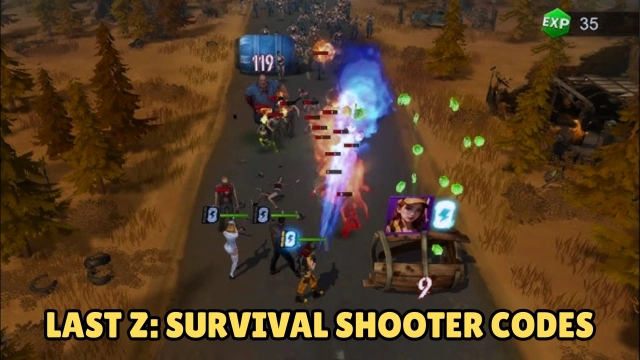


Last Z: Survival Shooter is a Strategy game developed by Florere Game, and LDPlayer is the best platform for playing Last Z: Survival Shooter on Windows PC, offering powerful features for an immersive experience.
When playing Last Z: Survival Shooter on your computer, you can enjoy long game sessions using the operation recording feature to record repetitive operations to complete the same tasks automatically. It allows you to level up faster and makes resource grinding much more efficient.
In addition, if you want to execute combo moves or the game requires repeated skill actions, the macro feature is your best helper. It enables you to complete kills with just one click!
If you want to manage multiple accounts, LDMultiplayer and Synchronizer will assist you. You can run multiple alternative accounts at the same time to assist the leveling of your main account. Download and play Last Z: Survival Shooter on PC with LDPlayer now!
In an apocalyptic world overrun by the undead, where the fate of humanity hangs in the balance amid diminishing living spaces, will you rise as the hero we need to reshape the destiny of humankind? Uncover the adventure of Last Z: Survival Shooter – your destiny awaits!Dodge & Shoot
In the heart of the zombie-infested apocalypse, survival is not just a choice but an exhilarating stage, challenging the prowess of dodging and shooting skills. Navigate through waves of relentless undead, strategically evading their onslaught while honing your precision shooting. Each dodge and shoot propel you closer to victory, earning you abundant rewards in this thrilling game of wits and reflexes.
Explore & Expand
Brace yourself for an adrenaline-fueled journey where the apocalypse is your playground for exploration and expansion. Explore abandoned areas, uncover hidden treasures, grow from epic battles, and forge bonds with reliable companions who accompany you through thick and thin. Every step of the way brings you closer to establishing your own doomsday shelter.
Survive & Thrive
In Last Z: Survival Shooter, survival marks merely the starting point as you endeavor not just to survive but to thrive amid impending annihilation. Through exploration, expansion, and evolution, the world transforms into a vast canvas of growth and opportunity. Your prowess ascends across economic, technological, and military realms, unlocking boundless potential. And your burgeoning shelter will ultimately emerge as a beacon of hope for human civilization.
Explore, thrive, and redefine the meaning of survival in this gripping saga. Download Last Z: Survival Shooter now, plunge into the ultimate test of survival, and unveil the depths of your courage to conquer the apocalypse!