How to Play Skyria: Cloud Fantasia on PC?

Diluka Chamara
|2026-04-23It’s time to enjoy the epic Skyria: Cloud Fantasia gameplay experience on PC with better visuals and smoother performance. The best choice is LDPlayer emulator, it lets you play using a keyboard and mouse for easier control and improved gameplay. It makes movement, combat, and skills more comfortable and precise than mobile play. Now let’s go through how to set up LDPlayer and start playing on PC for a smooth and enjoyable gaming experience.
Contents
How to Play Skyria: Cloud Fantasia on PC with LDPlayer in 4 Easy Steps
Step 1: Download and Install LDPlayer Emulator
To enjoy Skyria: Cloud Fantasia on a bigger screen with smooth controls, the first thing you need is an Android emulator. Choose LDPlayer 9, it’s the best pick for stable gaming performance with better visuals.
1.1 – Go to the official LDPlayer website and download the latest version of LDPlayer 9.

1.2 – Once the download is complete, open the installer by double-clicking it.
1.3 – Click Install and let the setup finish (it usually takes just a few minutes).
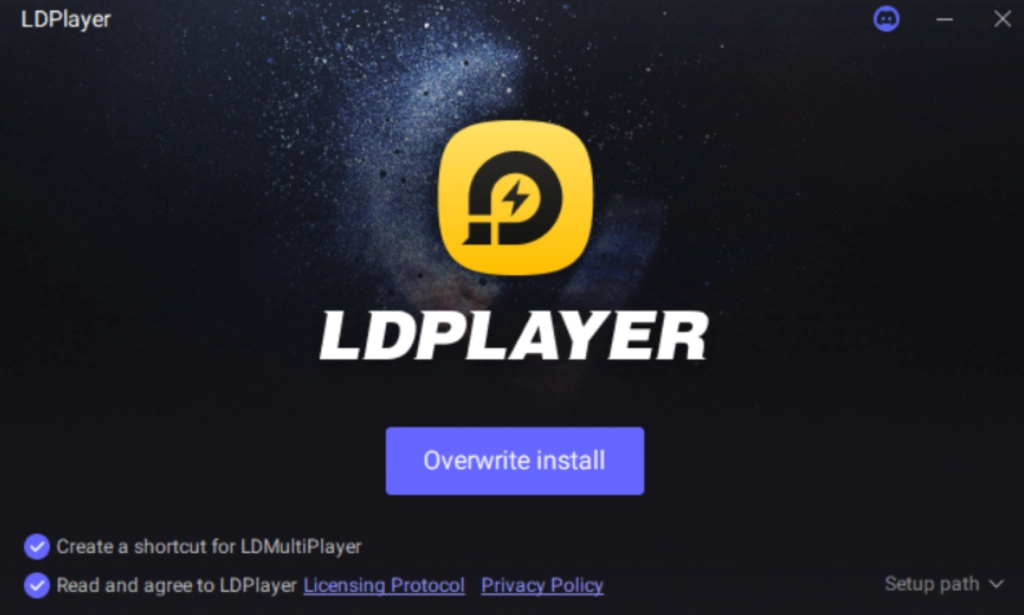
1.4 – After installation, launch LDPlayer from your desktop or Start menu. Your PC is now ready to play mobile games.
Step 2: Find and Download Skyria: Cloud Fantasia
After installing LDPlayer, you can now search for the game and install it inside the emulator.
2.1 – Open LDPlayer and use the search bar on the home screen.
2.2 – Type “Skyria: Cloud Fantasia” and make sure to choose the official version developed by Pixel Spirits.
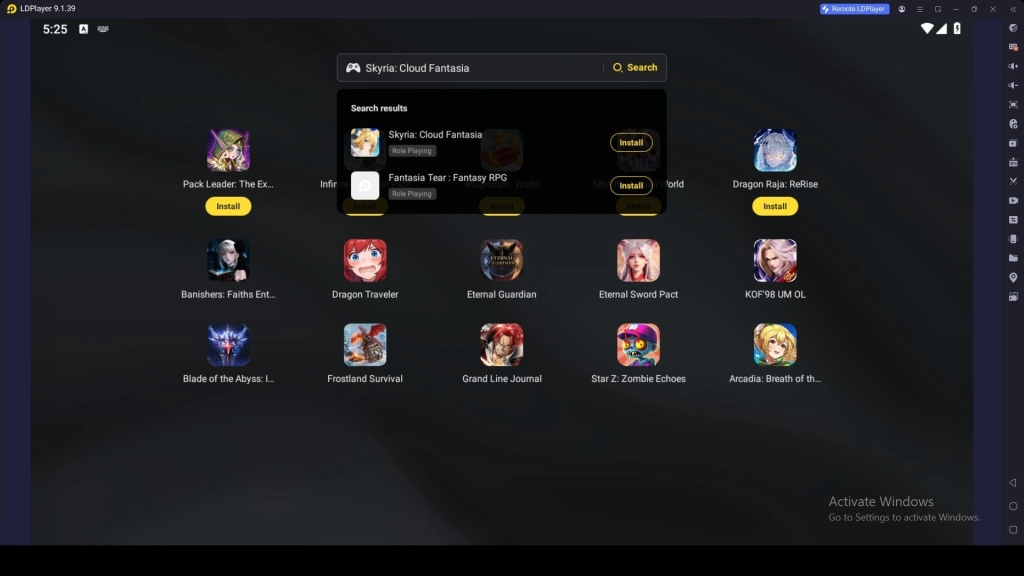
2.3 – Click the Install button to begin downloading.
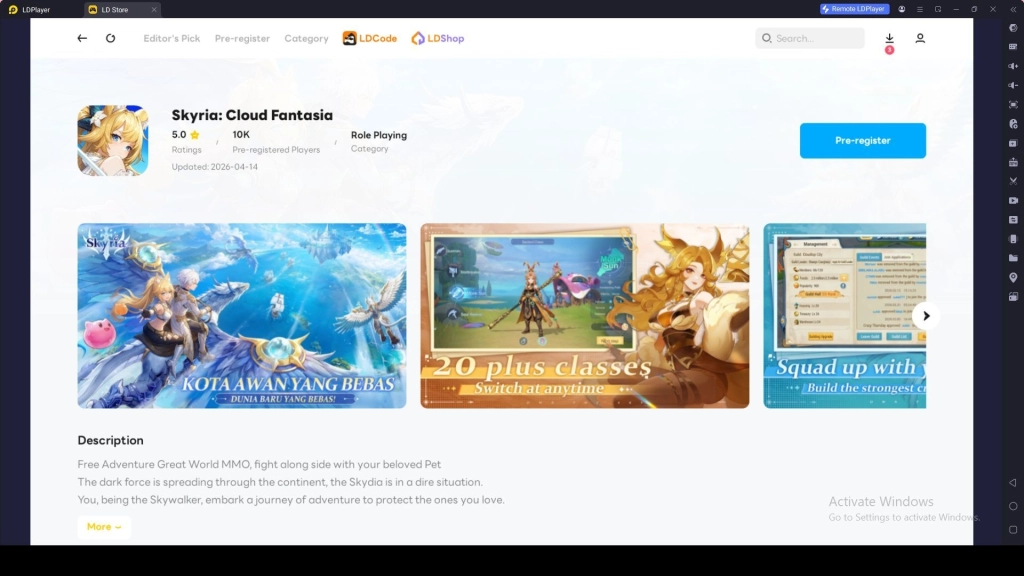
2.4 – If the Play Store opens automatically, just continue to the next step.
Step 3: Sign in to Google Play (If Required)
If you are redirected to the Google Play Store before installing the game, you need to log in to your Google account to continue.
3.1 – Click Sign In on the Google Play Store screen.
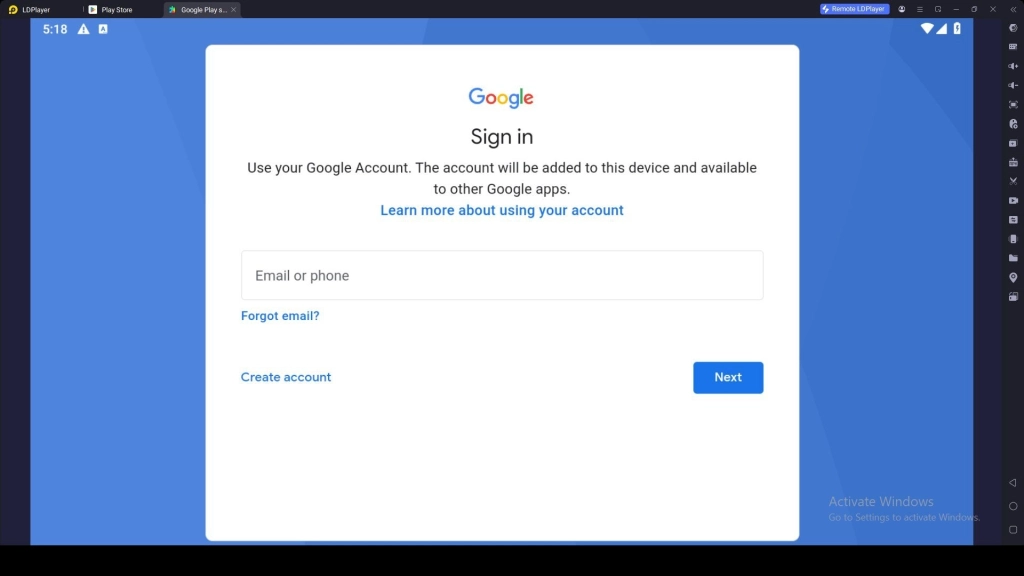
3.2 – Enter your Gmail details or create a new account if you don’t have one.
3.3 – Complete the login process, including password and verification if needed.
3.4 – Accept the terms and conditions to continue.
3.5 – Choose whether to enable Google backup, then press Accept.
3.6 – Once logged in, search again for Skyria: Cloud Fantasia.
3.7 – Tap Install and wait for the download to finish.
3.8 – After installation, the game icon will appear on your LDPlayer home screen.
Hot Recommend
Download LDPLAYER, play Skyria: Cloud Fantasia on PC, enhance your gaming experience!


Step 4: Download Game Data and Start Playing
You’re almost ready to begin playing Skyria: Cloud Fantasia on PC. Just follow these final steps before jumping into the game.
4.1 – Open the game from the LDPlayer home screen.
4.2 – Tap Confirm to start downloading additional game data.
4.3 – Once the download is complete, choose to create a new account or log in.
4.4 – Select your preferred login method (Google, Facebook, etc.).
4.5 – After logging in, you’re all set to explore Skyria: Cloud Fantasia on PC with smoother gameplay and better controls.
Optimize Your In-Game Performance with LDPlayer
While you are starting your Skyria: Cloud Fantasia adventure on PC, you have the chance to optimize your gameplay by fixing slowdowns, reducing lag issues, and making your game run smoother than ever.
Boost Performance with CPU and RAM Allocation
If you are facing minor lag issues while playing the Skyria: Cloud Fantasia, you can make your gameplay smoother by adjusting your CPU and RAM settings in LDPlayer. Here is how to do it:
- Open LDPlayer Settings > Go to the Advanced tab. (Here you can customize how much power the emulator uses from your PC.)
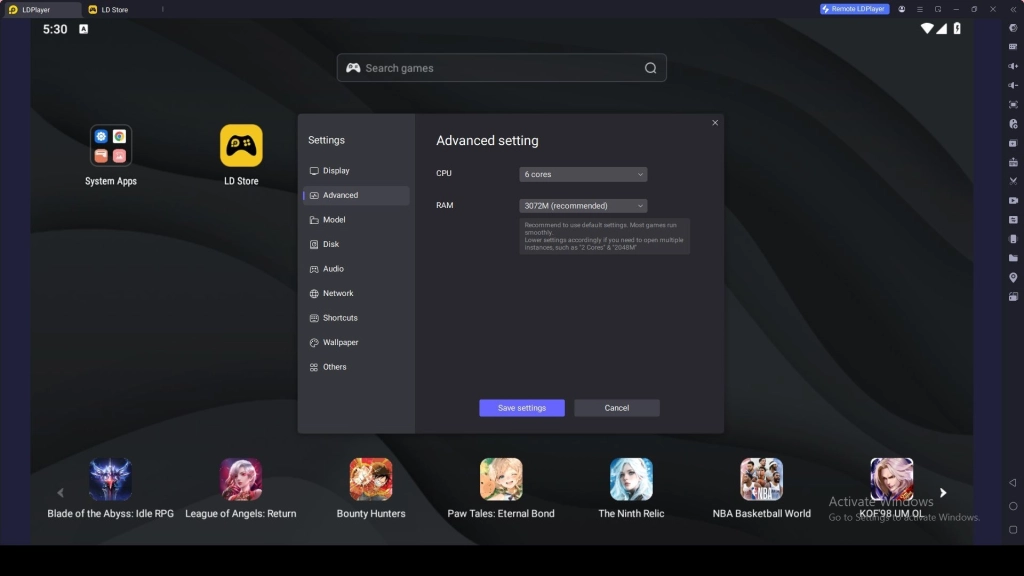
- Set the CPU to around 6 cores and allocate about 6GB of RAM for a balanced and stable experience. If your PC has higher performance capacity, you can increase the RAM even further to get an even better experience.
Boost Emulator Speed with Virtualization Technology
Most modern CPUs come with Virtualization Technology (VT). This feature allows your CPU to act like multiple operations running at once within the same machine, which helps LDPlayer perform much better in your gameplay. So, you can enable Virtualization Technology (VT) to improve the speed and stability of LDPlayer and enjoy a smoother Skyria: Cloud Fantasia experience.
How to enable VR: Go to your PC’s BIOS settings and turn on Virtualization Technology (VT). Once enabled, restart your PC and launch LDPlayer again to feel the performance boost.
Upgrade Graphics Drivers for Smoother Gameplay
Your graphics driver helps your PC run games using your GPU. Keeping it updated is more important if you are looking for better visuals and higher FPS while playing Skyria: Cloud Fantasia on your PC.
If you have both integrated and dedicated graphics, make sure LDPlayer is using the dedicated GPU for the best performance. After that, you can use a tool like Driver Booster to update your graphics drivers easily. This will help improve overall graphics quality and make your gameplay much smoother and more enjoyable.
Enhance Your Gameplay with LDPlayer Features
Now you are all set to run an epic Skyria: Cloud Fantasia gameplay on PC using LDPlayer with much smoother performance. In addition to that, LDPlayer offers several special features that help enhance your gameplay experience in an easier and more efficient way.
Custom Controls with Keyboard Mapping
Skyria: Cloud Fantasia is a fast-paced RPG where quick movement, skill timing, and targeting enemies are very important in every battle. Playing on PC with LDPlayer makes this much easier using the Keyboard Mapping feature.
It lets you change touch controls into a keyboard and mouse setup, so you can move faster, use skills more easily, and control fights with better accuracy and comfort. With this feature, you can adjust any action to match your own play style by customizing the key layout for easier battles.
Here’s how to set up your own keyboard layout:
- Open the Keyboard Mapping panel (press F12 or click the keyboard mapping icon on the toolbar)
- Drag and position on-screen controls where they feel easiest to use
- Match keys with in-game actions for a natural control flow
- Assign keyboard or mouse buttons for faster reactions
- Save your custom layout so you can use it anytime
Not only that, you can also create one-key macros using the Keyboard Macro feature to combine multiple skills and perform them with a single press. You can even set delays to match skill cooldowns and create looping sequences for smoother and more efficient skill combinations with just one key.
Try All Character Classes at Once with Multi-Instances
Skyria: Cloud Fantasia offers a variety of character classes like Mage, Archer, Oracle, Swordsman, Gunner, Combatant, and Rogue, each with a unique playstyle. Instead of sticking to just one, you can experience them all together using LDPlayer’s Multi-Instances & Sync feature.
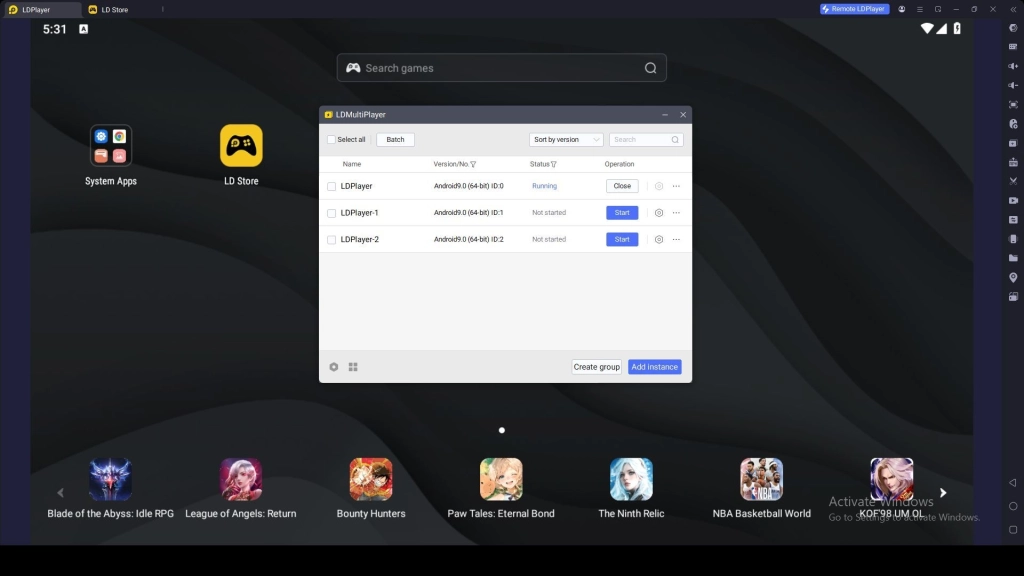
This feature allows you to run multiple game accounts at the same time, so you can try different classes side by side and see how each one performs in real gameplay.
- Here's how Multi-Instances & Sync Works:
- Open LDMultiPlayer from your desktop or toolbar
- Create multiple instances or clone your main one easily
- Log in with different accounts on each instance
- Use the Synchronizer tool to link all instances together
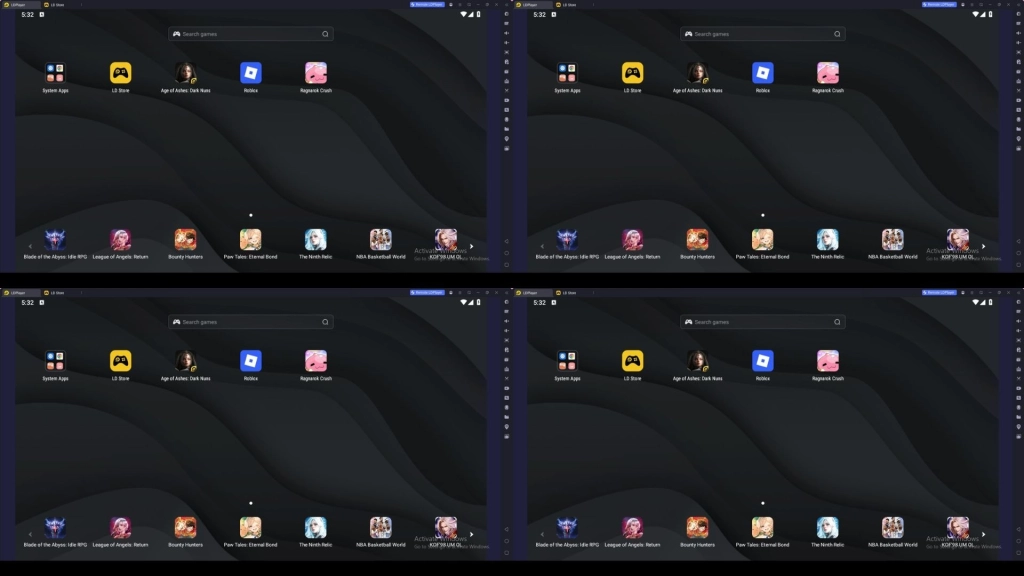
- Control all accounts at once and play simultaneously
With this method, you can test different classes and their playstyles at the same time. It’s a great way to explore every role in Skyria: Cloud Fantasia and enjoy a more flexible gaming experience.
Conclusion
LDPlayer is the best choice to play Skyria: Cloud Fantasia on PC with smoother performance, better visuals, and easy keyboard and mouse controls. In this guide, we covered all the best setup steps and LDPlayer features you can use to improve your gameplay experience. With these tools, you can enjoy faster control, less lag, and more fun. Now start your adventure and enjoy a smoother gaming experience on PC.
More from Skyria: Cloud Fantasia: