
Launch Error
Fix Multiple Instances Stuck at Engine Starting 94%
2021-12-31
Users of android emulators do like using instances to play several games simultaneously. But at the same time, open instances will consume lots of memory. If your instances are stuck at 94%, it's because there is no available Graphics memory. It will lead to 94% starting stuck, emulator crash/black screen, or Virtualbox crash.
In this post, I will guide you on how to fix this problem in LDPlayer. If there is a known issue with the graphics driver and to update it, you can refer to this article: How to Update Graphics Driver for Better Performance.
Contents
- 1. How to Check the Available Graphics Memory
- 2. Best Settings/Configuration for Using Multi-instances
How to Check the Available Graphics Memory
Step 1. Download this tool to check the Graphics Memory: GPU-Z.
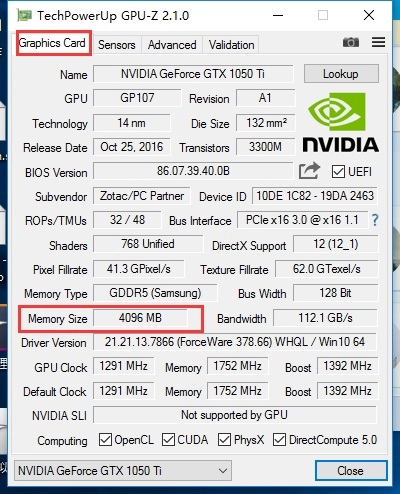
Step 2. After installation, you can check the memory size of the Graphics Card.
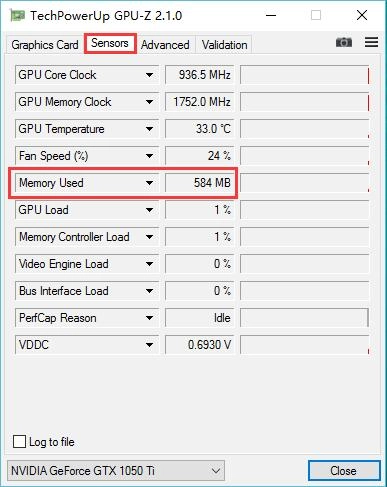
Step 3. Then switch to the Sensors category and check how much memory you have used.
Notice: If there is still 200M available in the 4G Graphics card, it means the memory is already full. So in this situation, the emulator will be stuck at the engine starting 94%.
Best Settings/Configuration for Using Multi-instances
Opening multiple instances of the Android emulator is limited by the hardware of your computer which includes CPU, graphic card, model, computer operating system, script, and settings.
CPU: The main factor. The more cores and threads of the CPU, the higher the performance of opening multiple instances.
Graphics Card: Multi-instance opening consumes the memory of the graphics card. The integrated graphics card has a temporary storage function. When a game starts to load special effects and content, it can greatly reduce the occupation of computer memory.
Model: NVIDIA is recommended for opening multiple instances. AMD is not a good choice for long-time instances opening, or it will lead to emulator crashes.
Script: The optimization of the script is crucial when opening multiple instances.
Settings: The following computer configuration is under the premise of one core emulator and 1G graphics memory.
In general, users can open 20 instances in the 4GB Graphics card. But if you meet the 94% stuck problem, you need to
a. The most direct way is to reduce the number of instances.
b. To lower the FPS of the instances. Here is the specific tutorial: How to Use FPS Settings Offered by LDPlayer
But this is most up to the equipment. So in the following, we list the best computer configuration for people who have a high demand of opening multi-instance and for who use Android emulator in general use respectively.
For High Demand:
CPU: E5 series
Graphics Card: GTX750ti and 1050ti
Memory: 32G
For example, if the CPU of your computer is 10cores & 20threads, you can open instances from 13 to 15 under the premise of one core emulator and 1G graphics memory. The same to two cores emulator and 2G graphics memory, you can open 6~8 instances.
For General Use:
CPU: i5 10400
Graphics Card: NVIDIA
Memory: 16G