
Launch Error
How to Create a Minidump File to Diagnose Blue Screen Errors
2025-05-09
Most Windows users are unfortunately familiar with the Blue Screen of Death (BSoD) — a critical system error that occurs when Windows encounters a problem that compromises system stability. This issue can be caused by faulty third-party drivers, hardware malfunctions, or even Microsoft system code errors.
One of the most effective tools for diagnosing BSoD issues is the minidump file, which contains essential data about the crash. In this guide, we’ll explain what a minidump file is, and how to enable Windows to automatically generate one.
Contents
What is a Minidump File?
A minidump file is a small memory dump file with a .dmp extension. It captures key diagnostic information about a system crash just before a blue screen error occurs. This data can help developers or support teams identify the root cause of the problem.
On Windows 10 and later, BSoD screens display a QR code and a stop code to help users look up additional information online. However, for more detailed analysis, a minidump file is far more valuable.
By default, Windows does not generate minidump files automatically—so you'll need to configure your system first.
How to Enable Minidump File Creation in Windows
Even if you haven't encountered a BSoD yet, it’s a good idea to enable minidump creation as a precaution. (Note: This process is general and not specific to any one software product.)
Follow these steps:
1. Press Win + S, type sysdm.cpl, and hit Enter to open the System Properties window.
(Alternatively: Go to Settings → System → About → Advanced system settings.)
2. In the System Properties window, go to the Advanced tab.
3. Under the Startup and Recovery section, click Settings.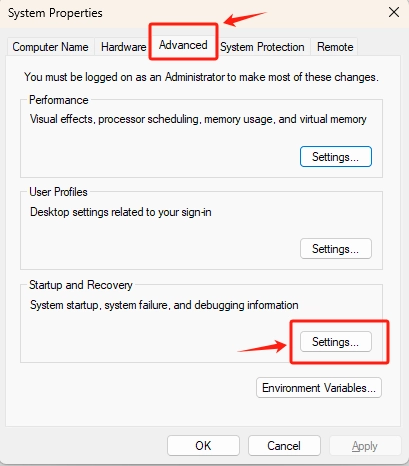
4. Configure the following options:
- Check Write an event to the system log
- Check Automatically restart
- From the dropdown under Write debugging information, select Small memory dump (256 KB)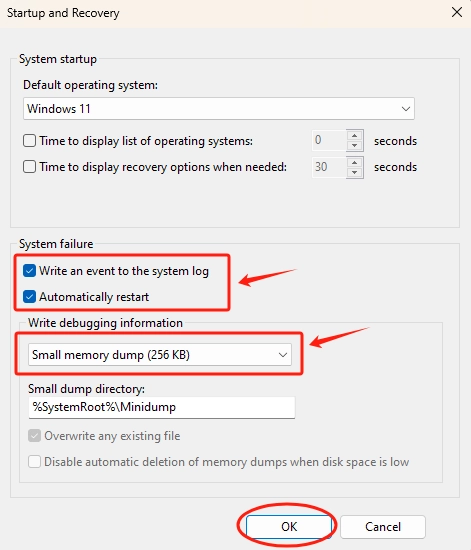
5. Click OK to save the changes.
6. Restart your computer.
Once this setup is complete, Windows will automatically generate a minidump file if a system crash occurs.
Where Are Minidump Files Stored?
By default, minidump files are saved in the following location: %SystemRoot%\Minidump
This usually translates to: C:\Windows\Minidump
While it’s possible to change this directory, we recommend leaving it as is. Many diagnostic tools are configured to look for minidump files in this default location.