home page
Games
Pre-RegisterRPGStrategyAdventureCasualArcadeRacingActionSimulation
Support
LDPlayer 9 IntroductionEnable VTStartup Stuck at 50%/94%Fix Invalid Virtual DiskUpdate Graphics DriverKeyboard MappingEnable LDMultiplayerFPS Setting
Blogs
Updates
LDGame
Affiliate
LDGame Community
download ldplayer
Download LDPlayer
English
繁體中文한국어Tiếng ViệtภาษาไทยPусскийPortuguêsEspañolFrançaisDeutsch日本語Indonesiaالعربية

LDPlayer Support

EmailFacebookDiscordLDGame Customer Service(For LDPlayer account & recharge problem)

Products

LDCloudOSLinkEasyFunLDShop

About

About UsBusiness InquiryDMCA Takedown

Follow Us

©2025 LDPLAYER.NET , ALL RIGHTS RESERVED.JUST OKAY LIMITED , OFFICE F, 12/F, YHC TOWER , 1 SHEUNG YUET RD, KOWLOON BAY KLN, HONG KONG
Games and applications on this site are collected from the internet. If there is any infringement, please contact the email: support@ldplayer.net
Privacy Policy|GDPR Privacy Notice|Help Translate
English
繁體中文한국어Tiếng ViệtภาษาไทยPусскийPortuguêsEspañolFrançaisDeutsch日本語Indonesiaالعربية

Support/

Game Troubleshooting

How to Solve Apex Legends Mobile Device Not Compatible Problem in LDPlayer

2022-03-11

If it shows that 'your device isn't compatible with this version' error when you search Apex Legends Mobile in LDPlayer,
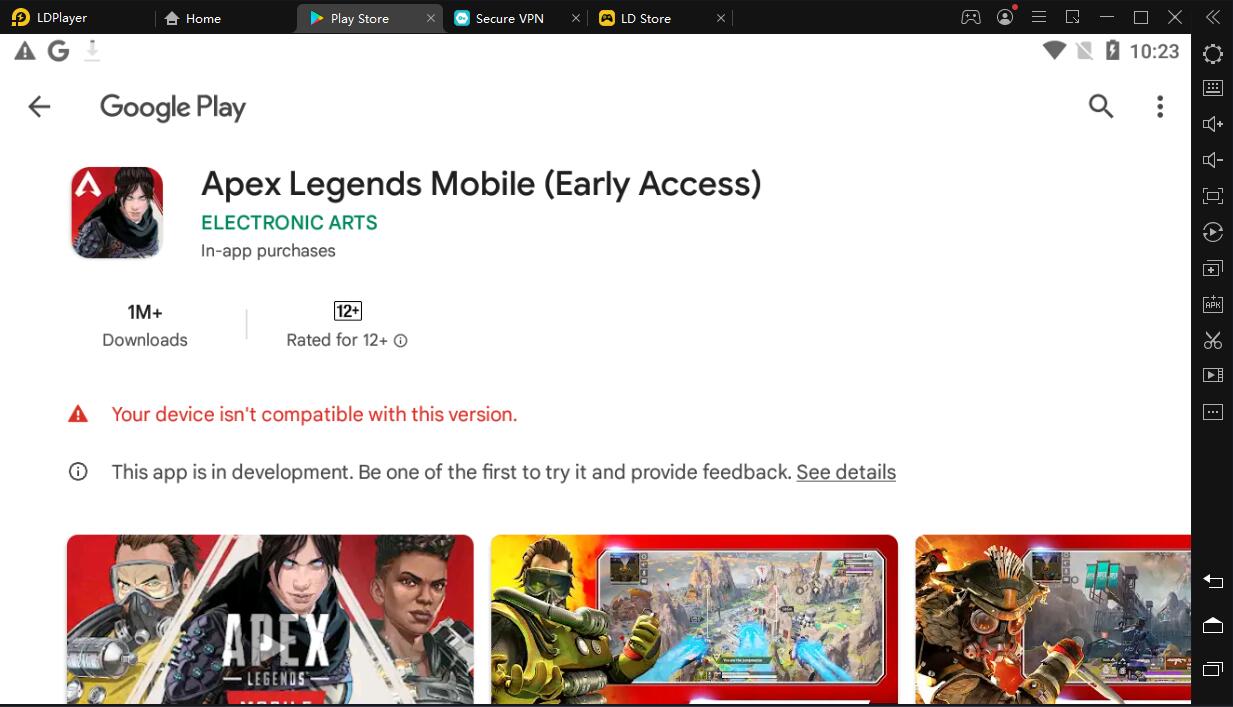
How to Solve Apex Legends Mobile Device Not Compatible Problem in LDPlayer

You can try the following steps:

1. Make sure you are using LDPlayer 4.0.78 (64-bit) version, the game can only run on the latest LDPlayer 64-bit version.


2. Go to LDMultiPlayer and create a new instance first and then download the game on the new instance.
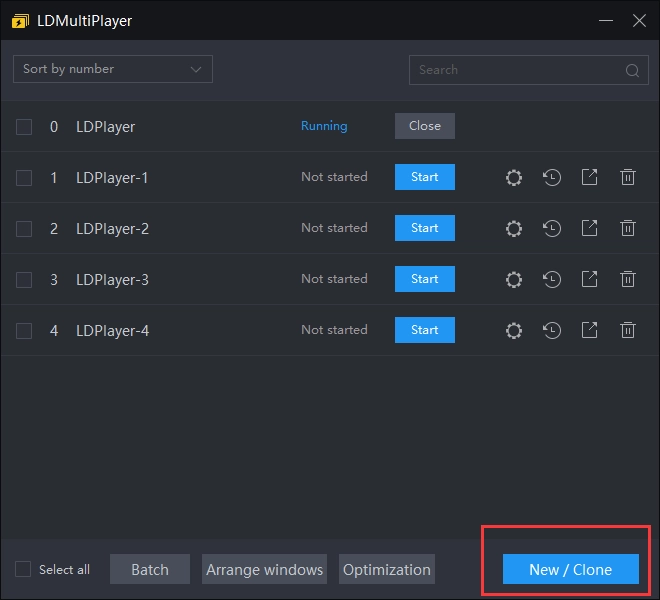
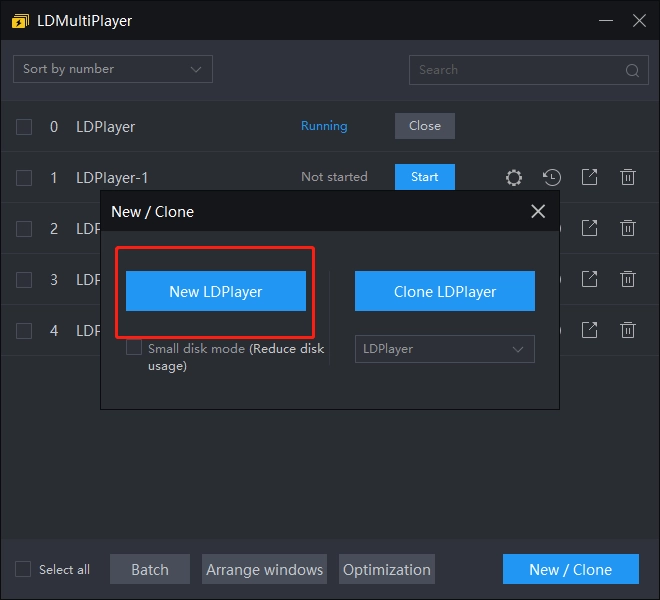
How to Solve Apex Legends Mobile Device Not Compatible Problem in LDPlayer

How to Solve Apex Legends Mobile Device Not Compatible Problem in LDPlayer


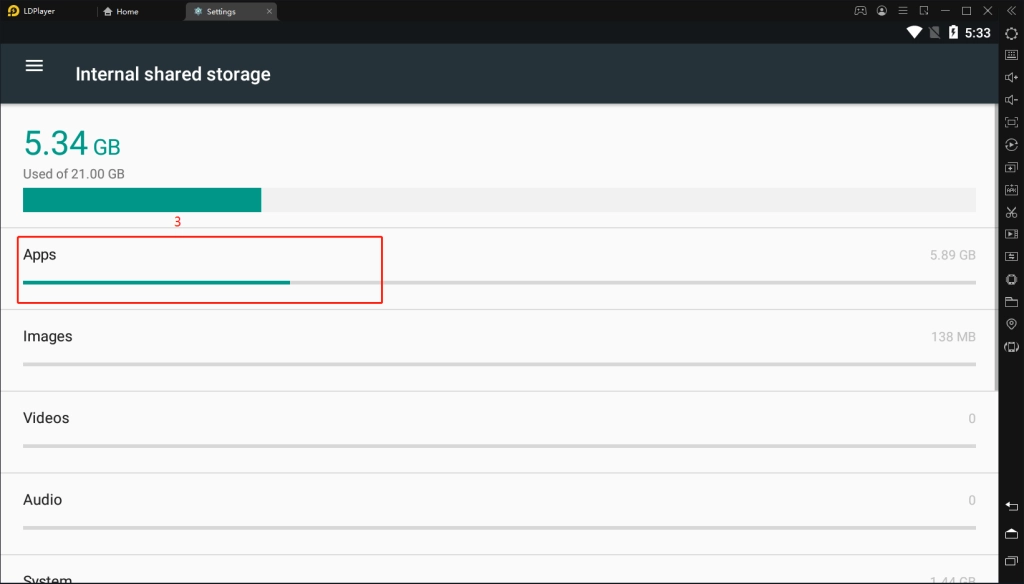
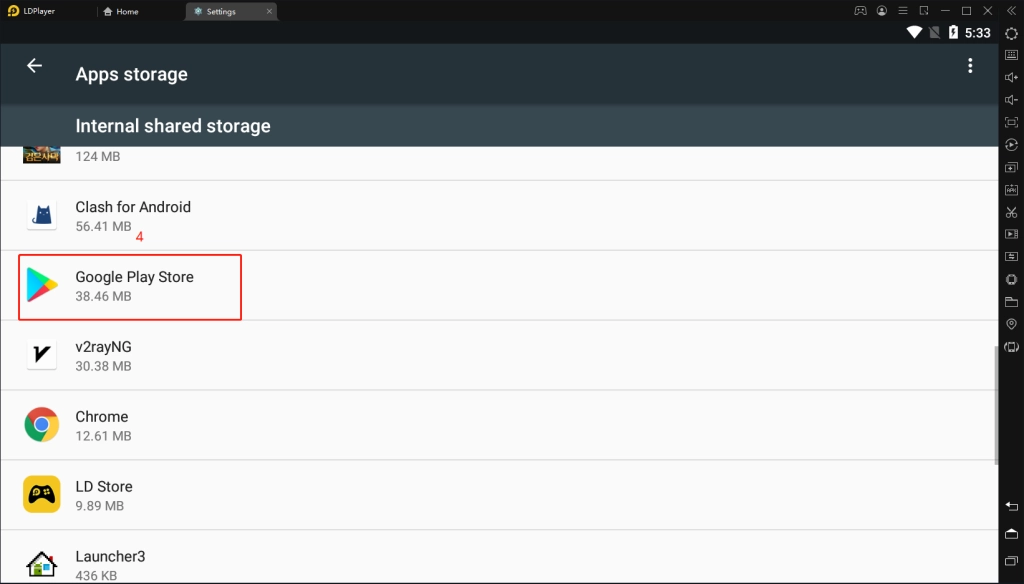
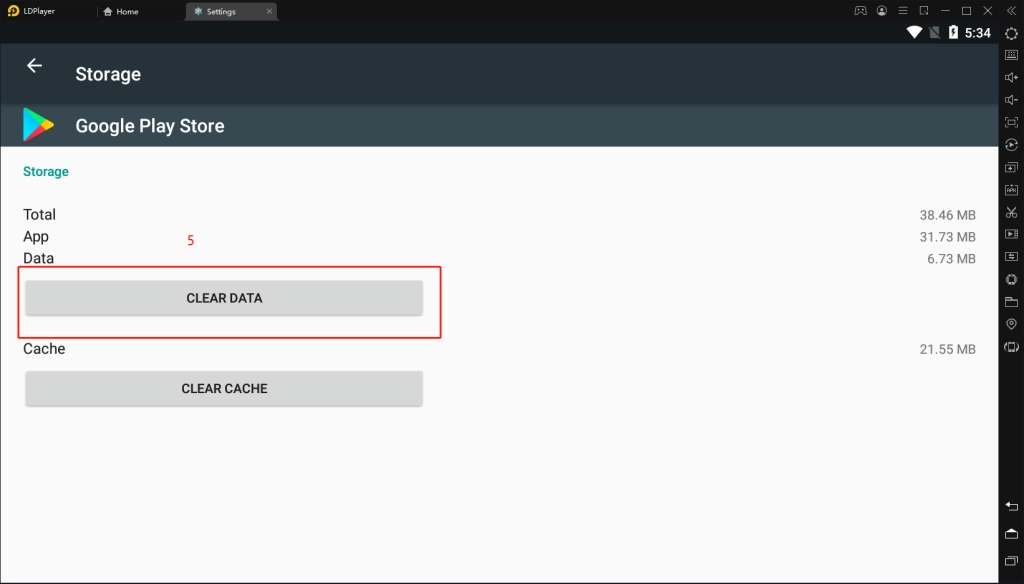
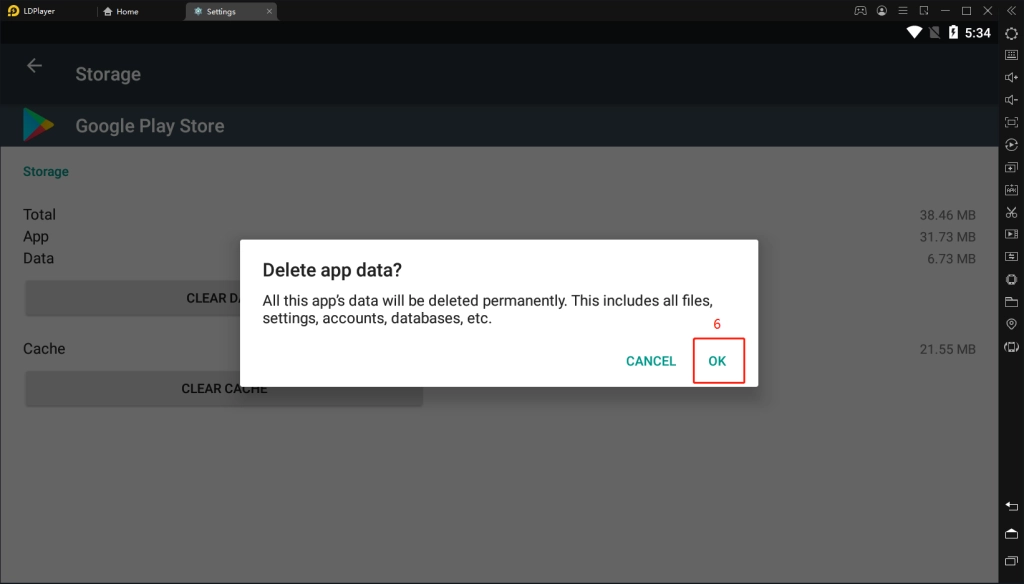
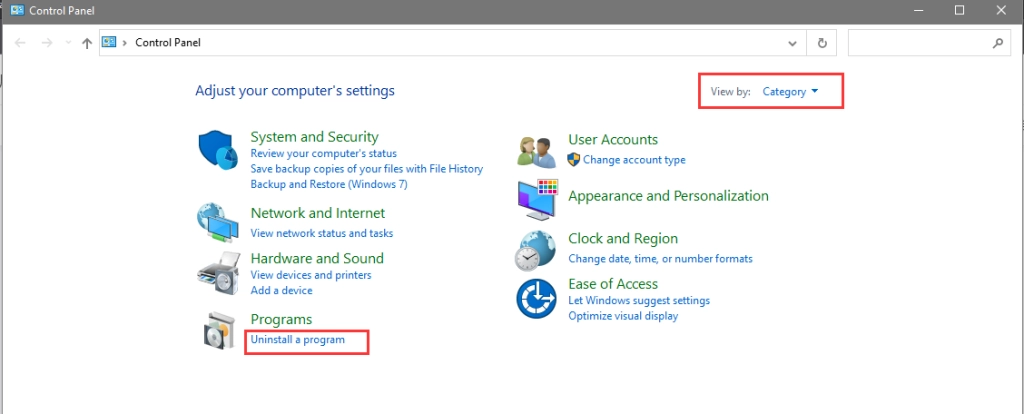
3. Close your google play store > clear data of google store as shown in the following pictures > reopen google play store and download the game.
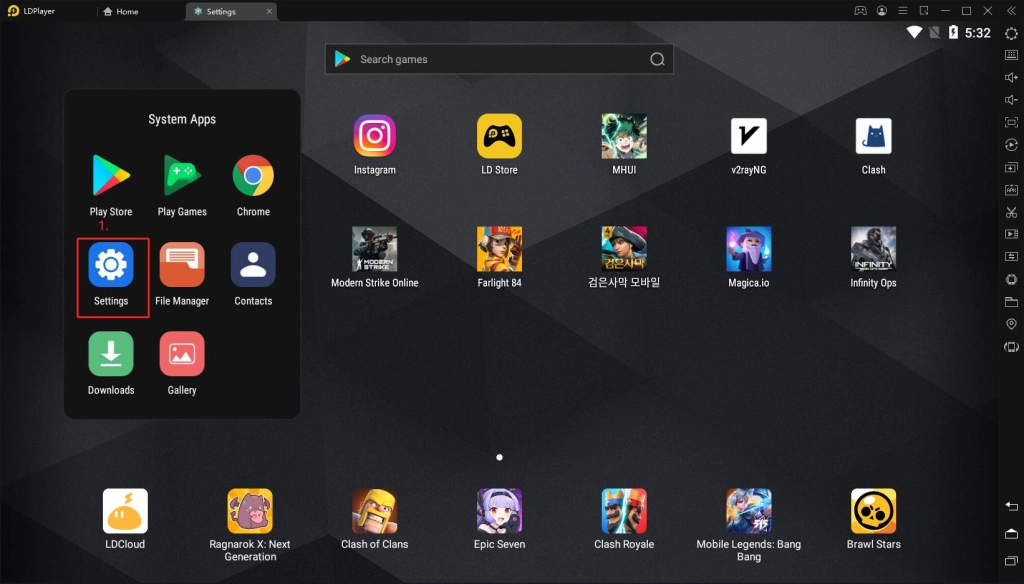
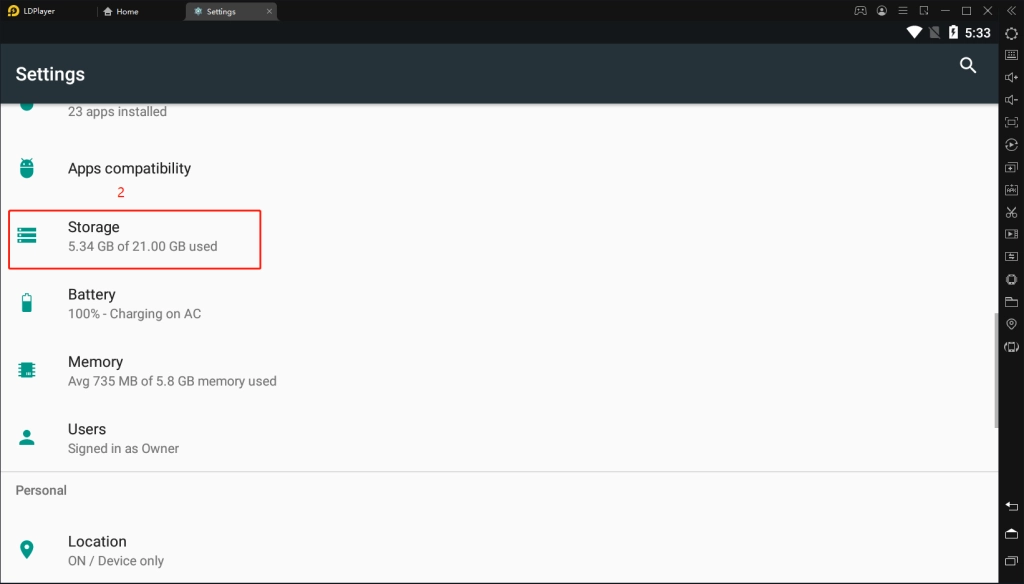
How to Solve Apex Legends Mobile Device Not Compatible Problem in LDPlayerHow to Solve Apex Legends Mobile Device Not Compatible Problem in LDPlayerHow to Solve Apex Legends Mobile Device Not Compatible Problem in LDPlayerHow to Solve Apex Legends Mobile Device Not Compatible Problem in LDPlayerHow to Solve Apex Legends Mobile Device Not Compatible Problem in LDPlayerHow to Solve Apex Legends Mobile Device Not Compatible Problem in LDPlayer

4. You can also give LDPlayer a clean reinstall by uninstalling it and reinstalling it again.
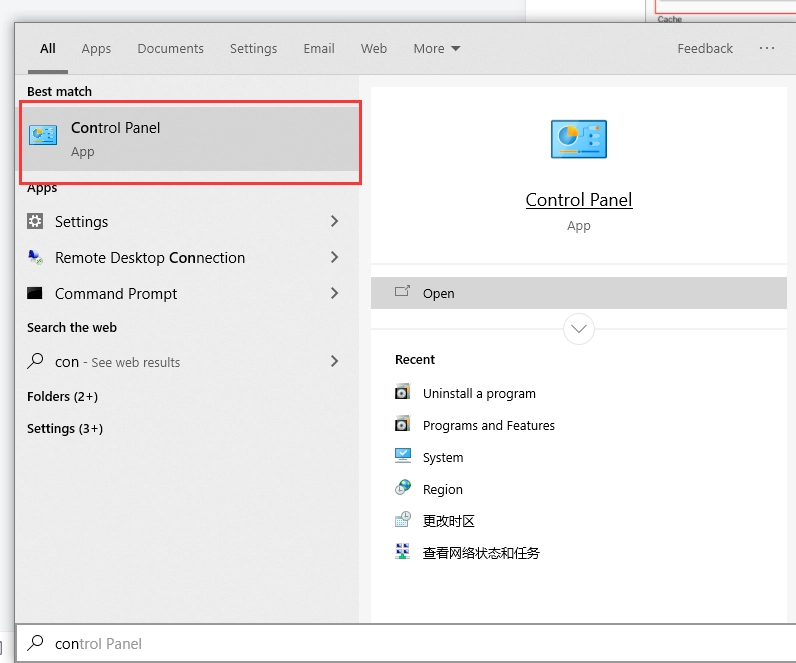
How to Solve Apex Legends Mobile Device Not Compatible Problem in LDPlayerHow to Solve Apex Legends Mobile Device Not Compatible Problem in LDPlayerHow to Solve Apex Legends Mobile Device Not Compatible Problem in LDPlayer

Was this article helpful?
48 users found this helpful.
Video Tutorials
LDPlayer Introduction
Affiliate Program
Launch Error
Enable Virtual Technology
Function Instruction
Game Installation
Device Optimization
Multi-instance
Network Bridging
Data Recovery/Backup
Game Troubleshooting
Free Fire: Sensitivity, Firing & ViewPUBG MOBILE: Not-supported DeviceDeploy operators in Arknights during the pause processMobile Legends: Bang Bang: Load FailureFree Fire: Black ScreenHow to Fix The Unexpected Crouching And Mouse Stuck Issues in Free FireKing's Raid: Notice to App Player UsersApex Legends Mobile: Game Installation GuideIs Flixtools: Movies Box & TV Show Not WorkingOctopath Traveler: CotC: Installation GuideHow to Solve Pokemon TCG Pocket Tap to Start Button Missing IssueHow to Solve Apex Legends Mobile Device Not Compatible Problem in LDPlayerEx Astris Optimization Guide & FAQSet up Tablet Resolution for Better Gaming Experience in Golden SpatulaHow to Play Call of Duty: Mobile with Ultra GraphicsEnable 165 FPS in Golden SpatulaResolve the Hardware Requirement Warning on Intel Integrated GPUsHow to Optimize Gaming Experience in Order Daybreak