Games
Support
Blogs
Updates
LDGame
Affiliate
LDGame Community

Follow Us

LDPlayer Support

EmailEmailFacebookFacebookDiscordDiscordLDGame Customer ServiceLDGame Customer Service(For LDPlayer account & recharge problem)

Products

LDCloudLDCloudOSLinkOSLinkEasyFunEasyFun

About

About UsAbout UsBusiness InquiryBusiness Inquiry

©2026 LDPLAYER.NET, ALL RIGHTS RESERVED. JUST OKAY LIMITED, OFFICE F, 12/F, YHC TOWER, 1 SHEUNG YUET RD, KOWLOON BAY KLN, HONG KONG

Games and applications on this site are collected from the internet. If there is any infringement, please contact the email: support@ldplayer.net
Software Licensing ProtocolSoftware Licensing ProtocolTerms of UseTerms of UsePrivacy PolicyPrivacy PolicyGDPR Privacy NoticeGDPR Privacy NoticeHelp TranslateHelp Translate

Support/

Game Troubleshooting

CookieRun Classic Ultra Wide Screen Setting

2026-07-07

Feature Overview

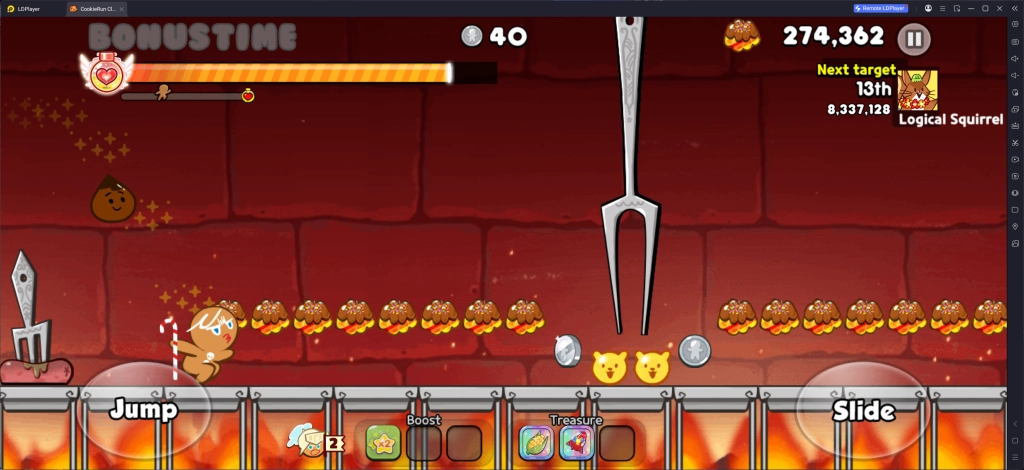
The emulator's Ultrawide Screen feature expands your field of view by extending the horizontal display, breaking the visual limitations of standard tablets and traditional monitors.

Core Advantage: Spot incoming obstacles, sudden stage mechanics, and distant hazards on the far right of the screen long before they enter a standard field of view.
In-Game Impact: By significantly widening your horizontal FOV, you gain much more time to react, drastically reducing unforced errors and boosting your overall survival rate during challenging levels.

Standard Tablet Resolution:
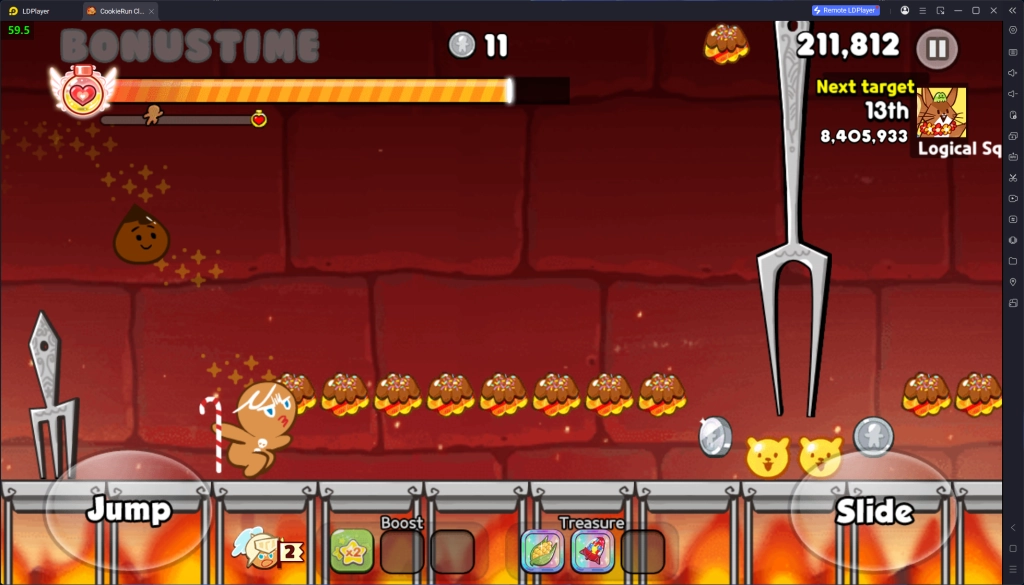
CookieRun Classic Ultra Wide Screen Setting

Ultrawide Resolution:

CookieRun Classic Ultra Wide Screen Setting

Setup Guide

Recommended Resolutions

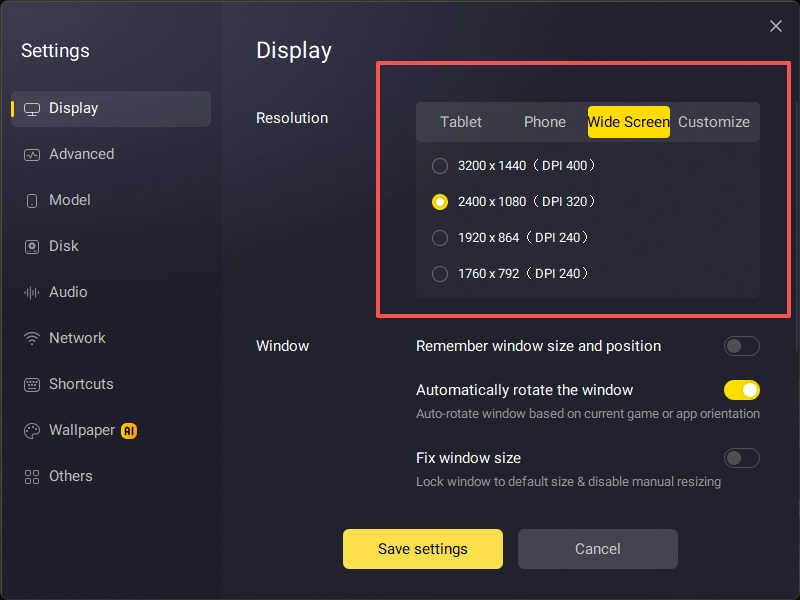
The following resolutions are optimized for a 2.22:1 golden widescreen aspect ratio. Please select the setting that best matches your monitor's performance:

Ultra-HD: 3200 × 1440

(Best for 2K/4K high-end monitors; delivers ultra-sharp graphical details)

HD Balanced: 2400 × 1080

(The go-to choice for mainstream rigs; offers the perfect balance between clarity and smooth performance)

Performance Mode: 1920 × 864 | 1760 × 792

(Ideal for budget or mid-range setups; ensures stable framerates and optimal performance)
CookieRun Classic Ultra Wide Screen Setting

Was this article helpful?
2 users found this helpful.
Video Tutorials
LDPlayer Introduction
Affiliate Program
Launch Error
Enable Virtual Technology
Function Instruction
Game Installation
Device Optimization
Multi-instance
Network Bridging
Data Recovery/Backup
Game Troubleshooting
Free Fire: Sensitivity, Firing & ViewPUBG MOBILE: Not-supported DeviceDeploy operators in Arknights during the pause processMobile Legends: Bang Bang: Load FailureHow to Fix The Unexpected Crouching And Mouse Stuck Issues in Free FireFree Fire: Black ScreenKing's Raid: Notice to App Player UsersApex Legends Mobile: Game Installation GuideIs Flixtools: Movies Box & TV Show Not WorkingOctopath Traveler: CotC: Installation GuideHow to Solve Pokemon TCG Pocket Tap to Start Button Missing IssueHow to Solve Apex Legends Mobile Device Not Compatible Problem in LDPlayerEx Astris Optimization Guide & FAQSet up Tablet Resolution for Better Gaming Experience in Golden SpatulaHow to Play Call of Duty: Mobile with Ultra GraphicsEnable 165 FPS in Golden SpatulaResolve the Hardware Requirement Warning on Intel Integrated GPUsHow to Optimize Gaming Experience in Order DaybreakPokemon Champions Single Ranked Battle ToolCookieRun Classic Ultra Wide Screen Setting