
Game Troubleshooting
Pokemon Champions Single Ranked Battle Tool
2026-07-01
Contents
Feature Overview
This tool supports one-click, fully automated execution of Single Battle in Ranked Battles. Each battle takes approximately 6–8 minutes. Designed to completely free up your hands, it allows you to effortlessly grind VP and Battle Pass rewards.

Prerequisites
Before launching the tool, please ensure your game account meets both of the following requirements:
1. Tutorial Completed: You have finished all in-game tutorials and successfully unlocked the Ranked Battle feature.

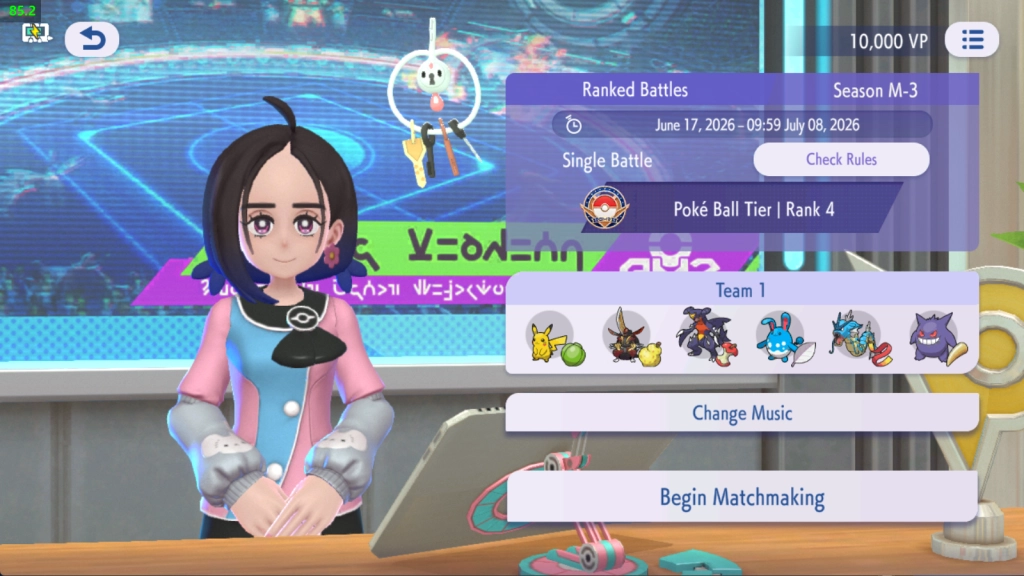
2. Interface Ready: In the game, navigate to Battle ➔ Ranked Battle ➔ Single Battle, and leave the game screen resting on the Single Battle matchmaking interface.

User Guide
1. Verify Emulator Version
The game is only compatible with LDPlayer 14 or higher. If you experience any issues running the game, please visit our official website to update to the latest version.
LDPlayer 14 Latest Version Download Link: https://static.ldrescdn.com/download/package/LDPlayer14_ens_99602_ld.exe?n=LDPlayer14_ens_jp.pokemon.pokemonchampions_99606_ld.exe
2. Adjust Emulator Resolution
The emulator must be set to one of the following resolutions:
1280 × 720 | 1600 × 900 | 1920 × 1080 | 2560 × 1440
How to set it: Click the ☰Menu icon in the top-right corner of LDPlayer -> Settings -> Display. Select one of the supported resolutions listed above -> Click Save Settings and restart the emulator for the changes to take effect.

3. Download the Tool
Important Note: The current version only supports launching and running the game in "Instance 0" (the first emulator instance). Multi-instance support and expanded features will be introduced in future updates.
Click the link below to download the dedicated tool:
https://static.ldrescdn.com/download/PokemonChampionsHelper_ens_1234_ld.exe

4. Setup & Launch
Launch Instance 0, open the game, and ensure the screen is resting on the Single Battle interface. Once ready, open the downloaded tool and click "Start running" to begin execution.
Troubleshooting & Interruptions
The execution may occasionally pause or get interrupted if it encounters non-battle screens, such as:
1. Story/Interface Changes: In-game dialogue cutscenes or rank-up animations triggered upon promotion that temporarily alter the standard post-match results screen.

2. System Pop-ups: Network instability alerts, daily reset notifications, or other system prompts.

Solution: Simply manually navigate back to the main Single Battle matchmaking interface and click "Start running" on the tool again to resume automated running.