home page
Games
Pre-RegisterRPGStrategyAdventureCasualArcadeRacingActionSimulation
Support
LDPlayer 9 IntroductionEnable VTStartup Stuck at 50%/94%Fix Invalid Virtual DiskUpdate Graphics DriverKeyboard MappingEnable LDMultiplayerFPS Setting
Blogs
Updates
LDGame
Affiliate
LDGame Community
download ldplayer
Download LDPlayer
English
繁體中文한국어Tiếng ViệtภาษาไทยPусскийPortuguêsEspañolFrançaisDeutsch日本語Indonesiaالعربية

LDPlayer Support

EmailFacebookDiscordLDGame Customer Service(For LDPlayer account & recharge problem)

Products

LDCloudOSLinkEasyFunLDShop

About

About UsBusiness InquiryDMCA Takedown

Follow Us

©2025 LDPLAYER.NET , ALL RIGHTS RESERVED.JUST OKAY LIMITED , OFFICE F, 12/F, YHC TOWER , 1 SHEUNG YUET RD, KOWLOON BAY KLN, HONG KONG
Games and applications on this site are collected from the internet. If there is any infringement, please contact the email: support@ldplayer.net
Privacy Policy|GDPR Privacy Notice|Help Translate
English
繁體中文한국어Tiếng ViệtภาษาไทยPусскийPortuguêsEspañolFrançaisDeutsch日本語Indonesiaالعربية

Support/

Game Installation

How to Log in to Mobile Games by Facebook in LDPlayer

2022-07-05

Facebook Login is a fast and convenient way for people to create accounts and log into your game across multiple platforms, such as Free Fire, Epic Seven, and so on. If you play mobile games in an Android emulator, you can also log in to games by Facebook. In this post, I will specify how to log in to mobile games by Facebook in LDPlayer and share you with some tips that you need to notice.


Content

  • Steps - Log in to Mobile Games by Facebook in Android Emulator

  • Tips - What You Need to Notice by Logging in with Facebook


Steps - Log in to Mobile Games by Facebook in Android Emulator


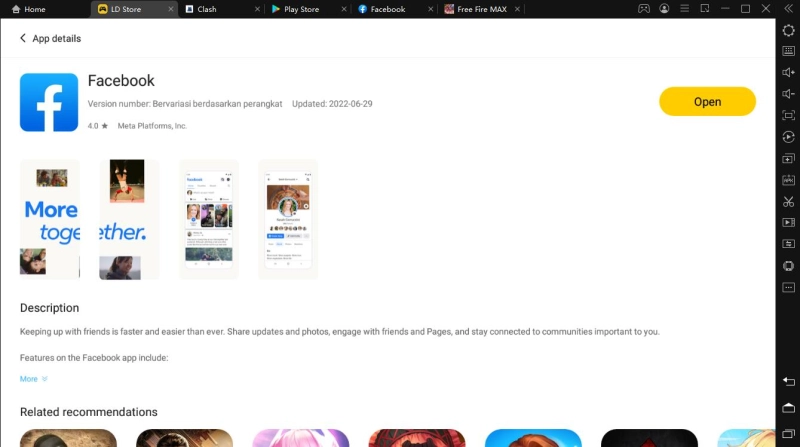
Step 1.   Install the Facebook app in LDPlayer. Please go to LD Store to download Facebook first if you want to log in to games by Facebook.
How to Log in to Mobile Games by Facebook in LDPlayer

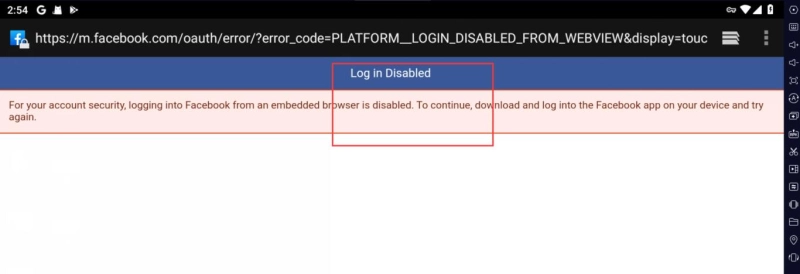
Note: You may wonder why not directly log into Facebook in Google embedded in Android emulator. Because it's disabled to log into Facebook from an embedded browser for account safety. It's the same for all the Android emulators.
How to Log in to Mobile Games by Facebook in LDPlayer


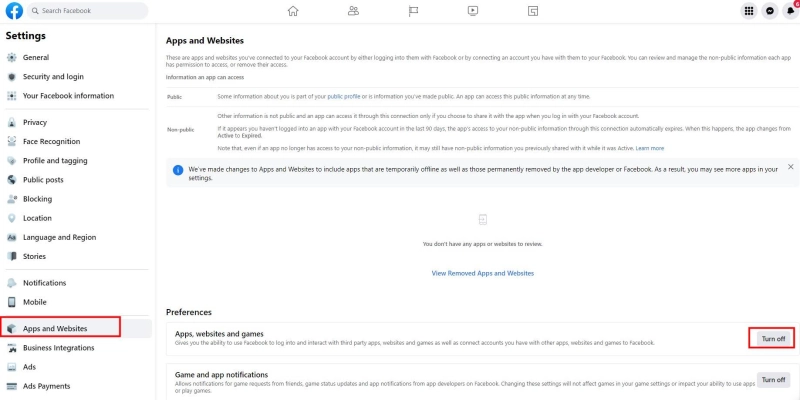
Step 2.  Go to Facebook Settings. Make sure you have allowed the use of Facebook to sign in to third-party applications: Setting & Privacy> Settings> Apps and Websites> click the Edit button in the Apps, Websites and Games section.
How to Log in to Mobile Games by Facebook in LDPlayer


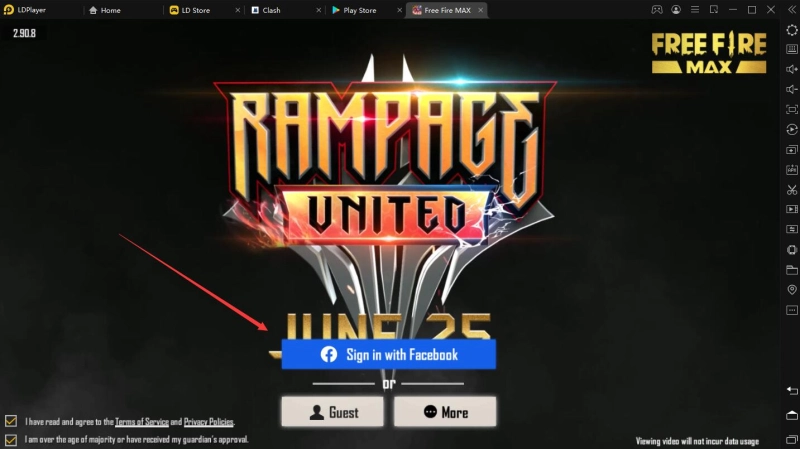
Step 3. Open the game you want to play. Then choose the Facebook option to log in. Then it will jump to Facebook for login. Input your account and then you can play the games successfully! Enjoy!
How to Log in to Mobile Games by Facebook in LDPlayer


Tips - What You Need to Notice by Logging in with Facebook

Facebook does more than help you stay connected with your friends and interests. You can play games with any of your Facebook friends. If you log in to mobile games by Facebook, here are tips you need to notice so that you won't lose the game data or even the game account.


a. You need to avoid the account-banned problem. Unlike Google accounts, Facebook is a social platform and there will be more chances to be blocked for some reasons (eg reported for false account info, unauthorized videos, etc). 


b. Facebook can be restricted in certain countries or regions. In such cases, there will be more chances to be banned.


You May be Interested In:

How to Backup/Restore Emulator Data for LDPlayer

Was this article helpful?
118 users found this helpful.
Video Tutorials
LDPlayer Introduction
Affiliate Program
Launch Error
Enable Virtual Technology
Function Instruction
Game Installation
Fix App Instant CrashDevice Isn't Compatible with This VersionInstall APK File with OBB DataInstall Games and AppsInstall APK FileInstall App Using XAPK FileGet APK Files from Installed Games/AppsRegister Bilibili Account to Play Chinese-only GamesSign out of Google AccountForm A XAPK FileEnable Developer OptionsInstall Games from Other SourcesInstall/extract installation packageLog in to Mobile Games by FacebookHow to Fix Launcher Installation FailureHow to Fix Resource Extraction Failure when Installing A Game via The Launcher
Device Optimization
Multi-instance
Network Bridging
Data Recovery/Backup
Game Troubleshooting