
Games
Support
Blogs
Updates
LDGame
Affiliate
LDGame Community

Follow Us

LDPlayer Support

EmailEmailFacebookFacebookDiscordDiscordLDGame Customer ServiceLDGame Customer Service(For LDPlayer account & recharge problem)

Products

LDCloudLDCloudOSLinkOSLinkEasyFunEasyFun

About

About UsAbout UsBusiness InquiryBusiness Inquiry

©2026 LDPLAYER.NET, ALL RIGHTS RESERVED. JUST OKAY LIMITED, OFFICE F, 12/F, YHC TOWER, 1 SHEUNG YUET RD, KOWLOON BAY KLN, HONG KONG

Games and applications on this site are collected from the internet. If there is any infringement, please contact the email: support@ldplayer.net
Software Licensing ProtocolSoftware Licensing ProtocolTerms of UseTerms of UsePrivacy PolicyPrivacy PolicyGDPR Privacy NoticeGDPR Privacy NoticeHelp TranslateHelp Translate

Support/

Function Instruction

How to switch from landscape to portrait

2018-05-10

1. Click Settings on the right toolbar.
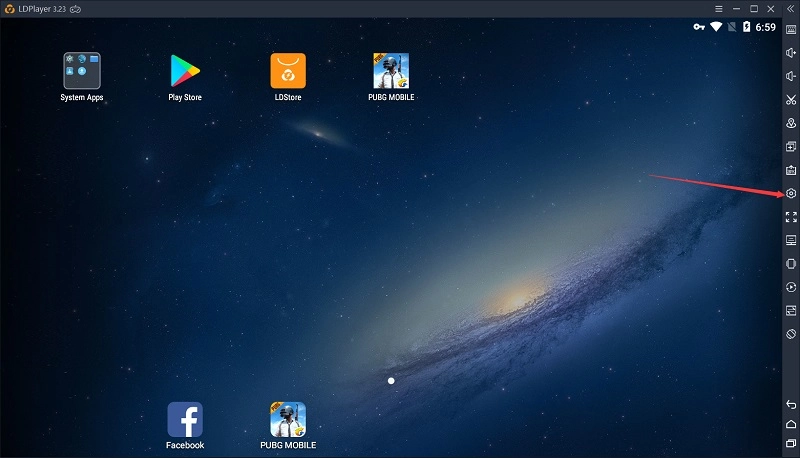
How to switch from landscape to portrait


2. Click Mobile. 

3. Select the resolution you want to use and then click the button Save.
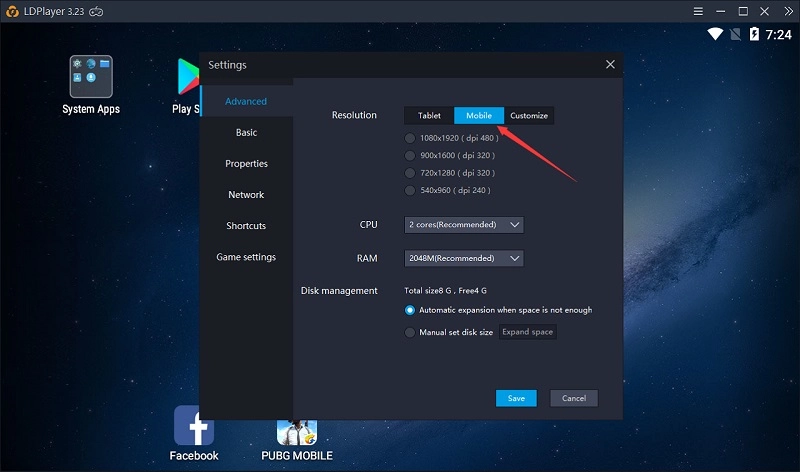
How to switch from landscape to portrait


4. Restart LDPLayer for these setting changes to take effect. 

Was this article helpful?
49 users found this helpful.
Video Tutorials
LDPlayer Introduction
Affiliate Program
Launch Error
Enable Virtual Technology
Function Instruction
Synchronizer ToolKeyboard MappingShared FolderKeyboard Macro Command120 FPS Setting: Play Games at 120 FPS on LDPlayer 9Operation Recorder: Write ScriptGamepad ControllerCommand Line InterfaceHide key PromptSwitch Languages of LDPlayerClear Disk Cache & Release Disk SpaceRecord Window PositionVideo RecorderXposed Installer SetupSwitch from Landscape to PortraitAdjust Y SensitivityDiagnostic InformationCloud Service & Sharing FeatureOperation Recorder: Merge Scripts
Game Installation
Device Optimization
Multi-instance
Network Bridging
Data Recovery/Backup
Game Troubleshooting